Airbnb CSV → Schedule E

Know your real profit, what to set aside for taxes, and hand your CPA a ready pack — all year, not just in April.

Upload your Airbnb transaction-history CSV and get a reconciled income breakdown, per-property P&L, and Schedule E data in 2 minutes — free. Go Pro for quarterly estimated-tax figures computed from your own numbers, expense tracking, and a one-click CPA Handoff PDF.

See it work on real sample data → Full working demo — every tab, including the Pro cockpit. No signup, no upload, nothing to install. Or upload my own CSV Works whether or not you received a 1099-K. Your data stays private — read exactly how we handle it → Roost Ledger is an independent product — not affiliated with, endorsed by, or sponsored by Airbnb, Inc.
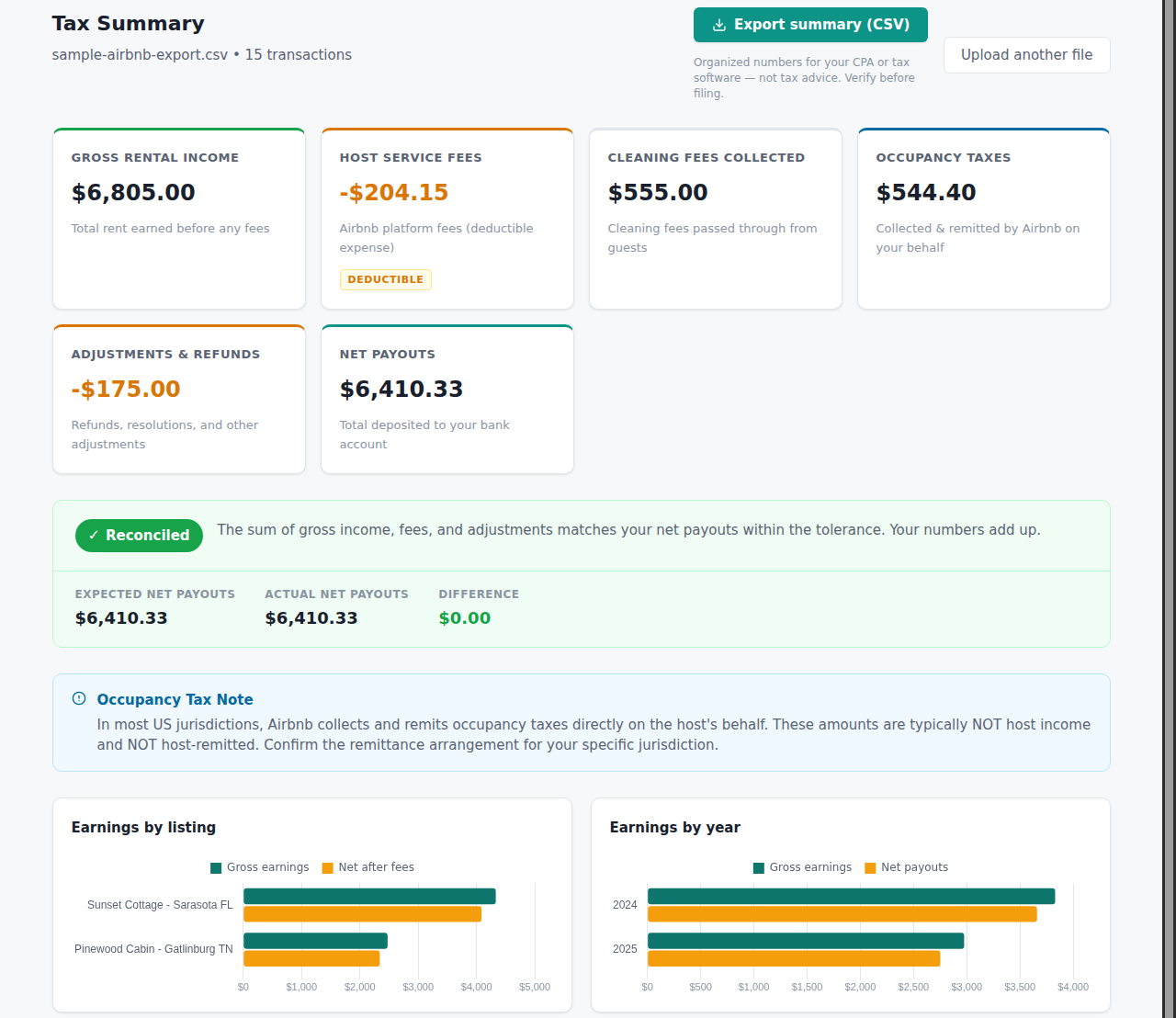
Roost Ledger financial summary: reconciled income cards, a green Reconciled badge, and earnings charts by listing and by year

Actual output from the sample dataset — click the screenshot to explore it live.

Most Airbnb hosts fly financially blind between tax seasons.

A lump-sum deposit, scattered receipts, and a surprise quarterly-tax penalty are not a money management strategy. There is a better way.

One deposit, five hidden numbers

Airbnb sends a single net payout. Gross earnings, host service fees, cleaning fees, occupancy taxes, and refunds are bundled together — invisible until you dig into the CSV. Without reconciling them you cannot know your real income for Schedule E.

Hosts underreport or overpay taxes

Report the net payout as income and you have underreported. Report gross without claiming deductible host fees and you have overpaid. Both are common. The right airbnb accounting software reconciles the math so you report exactly what the IRS expects on Schedule E.

Quarterly estimated taxes catch hosts off-guard

The IRS expects four payments per year — Jan 15, Apr 15, Jun 15, Sept 15. Miss them and you pay penalties on top of the tax bill. Most short-term rental hosts do not know what to pay until it is too late to avoid the penalty.

CPA prep is a scramble every April

Receipts in one spreadsheet, Airbnb income in another, 1099-K numbers that do not match what hit your bank — every year. Full bookkeeping software like QuickBooks is overkill for one rental property and a CSV. There should be a simpler path to a CPA-ready file.

Upload once, stay clear all year

Start with your Airbnb CSV. Add expenses as they happen. Re-export each quarter to keep the tax figures current. Hand your CPA one file at year-end.

Your Airbnb CSV Transaction History export — one bundled payout Reconciled into five figures the numbers the single payout hides Gross earnings income Host service fees deductible Cleaning fees income + expense Occupancy taxes pass-through Refunds & adjustments reduces income Schedule E worksheet Lines 5–19, per property + CSV export for your tax software CPA Handoff PDF Reconciliation summary, P&L, Schedule E & expense ledger Add your expenses to complete the P&L
Illustration of the data flow — a diagram, not a screenshot. Open the live demo to see the real output on sample data.
1

Upload your CSV

Grab your Transaction History export from the Airbnb host dashboard (Earnings → Transaction History → Export CSV) and drop it in. We parse any column layout automatically.

2

Reconcile & report

We separate gross earnings, host service fees, cleaning fees, occupancy taxes, and refunds — and delta-check everything against your 1099-K or payout totals. Reconciled badge, charts by listing and by year.

3

Track expenses & P&L

Log your property expenses (repairs, supplies, cleaners, insurance) with categories that map directly to Schedule E lines. Watch your per-property profit update in real time.

4

Quarterly estimated-tax figures

Re-upload your CSV each quarter (about two minutes). The app annualizes your year-to-date net profit, suggests the next 1040-ES payment, tracks what you have already paid, and emails you a reminder before each IRS deadline. The numbers are only as current as your last upload — the reminders are there to prompt it.

5

CPA Handoff at year-end

One click generates a CPA Handoff PDF: reconciliation summary, per-property P&L, Schedule E worksheet, and expense ledger — everything your accountant needs, nothing they have to ask for.

STR-specific depth. Zero bookkeeping setup.

Generic tools make you configure accounts and link bank feeds before you see a single number. This one starts working the moment you drop your CSV — and keeps working all year.

Income auto-reconciled from your Airbnb export

Unlike deduction-only trackers that make you type your gross income in by hand, we parse the full Airbnb transaction history and delta-check every line item against your actual payouts and 1099-K automatically.

Expense tracking with Schedule E categories built in

Add expenses at any time. Every category maps directly to an IRS Schedule E line — no manual cross-referencing, no guessing which line "cleaning supplies" belongs on. Your per-property P&L stays current month by month.

Quarterly estimated taxes computed from your real numbers

The app annualizes your actual year-to-date figures — not a rough estimate you type in — and tells you what to pay on each 1040-ES deadline. It reads whatever you last uploaded and logged, so you refresh it each quarter with a new CSV export rather than connecting a bank feed.

CPA Handoff Pack — one click, one PDF

At year-end, generate a single PDF your accountant can work from directly: reconciliation statement, per-property P&L, Schedule E worksheets (lines 5–19), and expense ledger. Replace a $500+ CPA prep surcharge with one button.

Simple, flat-rate pricing. No surprises.

Start free and see your reconciled numbers in 2 minutes. Upgrade to Pro when you want saved history, expense tracking, and the CPA pack.

Free
$0
forever

  • Reconcile unlimited Airbnb CSVs on screen
  • Gross income, fees, and deductions broken out
  • Earnings charts by listing and by year
  • No CSV export or saved runs
Get started free

Always know where you stand — not just in April.

Upload your Airbnb transaction history CSV and see reconciled income, per-property profit, and your next estimated-tax payment in two minutes. No bookkeeping setup. No QuickBooks subscription.

Get your financial summary → See a sample report first